triangles
Apr 8, 2026 - ⧖ 5 minPublished as part of 'jienetics' series.
When was still in college (and dinosaurs roamed the Earth) I would tinker on a side project, laconically labeled "triangles." The goal was simple enough, take an image as an input and using a fixed number of overlapping triangles, try to recreate the image as close as possible. I used genetic algorithms1 to accomplish this, mostly because they sounded cool, and because I was overflowing with ideas on how to 'tweak' the formula to see if it improved results.
This project introduced me to many many new programming concepts. For instance, I learned how to render triangles from first principles, first using the CPU, and later CUDA. You can tell I was reinventing the wheel because I didn't think to use the regular render pipeline for its god given purpose of rendering lists of triangles into an image (¬_¬") - in addition my CUDA implementation was somehow slower than my multithread CPU implementation, which is even more impressive given that my CPU algorithm used some crappy inequality checking to decide if a pixel was inside a triable. Fortunately, I'm much too proud to admit to these shortcomings.
It also made some cool art; below is the only image I could find from that era.
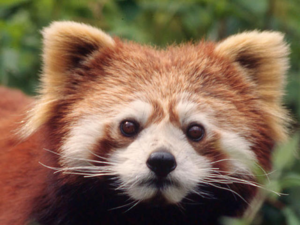
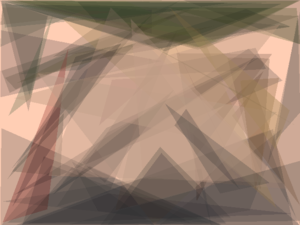
Anyways it's 45 years later and I wanted to revisit this project, and let me just say, WOW things can actually get better. My code took way less time to create ex nihilo, in fact it happened in a single evening while I was drinking gin. Big thank you to Rust for being an amazing language, all the multithreading and pointer issues while bit fiddling in my youth were not an issue here. Another shoutout to the Rayon library2 for making my single threaded version instantly become multithreaded with 0 issues. A self congratulating pat on the back for me, for improving over the lasta 45 years, and a final 'fuck u' to C++.
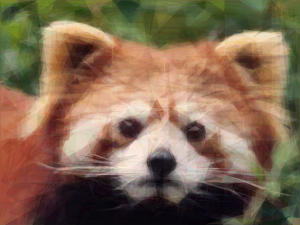
This version of the image is just under 11KiB, where the JPEG encoding is ~36KiB, and the PNG encoding (after crunching) is about ~131KiB. It's not as good as the jpg, but encouragingly it's not bad and it is appreciably smaller which piques my interest and gives me hope some good will come out of this experiment.
Now I'm wondering if triangles can ever hope to beat a DCT3.
The Code
The script I use has all hardcoded parameters, and is a real mom's spaghetti as I feverishly revised it with each new idea I had to improve the outputs. If you run it, it will begin 'drawing' the red panda photo seen above. It will use up to 2,730 triangles per sequences, 512 sequences per generation, and will run for a max of 4,194,304 generations, while printing out basic stats to the console every second or so.
It uses the strategy I came up with before finally retiring to bed, where it starts with 2 triangles tiled to cover the image, and when it can't make anymore progress after some number of generations, it will increase to 10 triangles, the original 2 triangles + 8 new triangles tiled to cover the image. This process repeates, with successively more triangles recursively tiling the image when it gets stuck. This method has the added benefit that the triangles in each sequence are more likely to be related to triangles in another sequence at or around the same index. These triangles always start with an opacity of 0, with the thought that until they are ready to add value it is better they remain hidden.
I'm sure I also fiddled with how many mututations are possible per sequence per generation but it's lost to me at time of writing.
You can find the source here: https://codeberg.org/xvrqt/genetic-image-encoder/src/tag/blogpost1
Viewing the Output
4,194,304 generations will take a long time to complete, with dubious benefits, so feel free to stop the program anytime. When you do, you will see two artifacts, as best.png which is roughly the best version the program came up while it was running, and stats.txt
Open best.png with feh4 to see progress take form as you run the program.
uplot
uplot lineplots -H stats.txt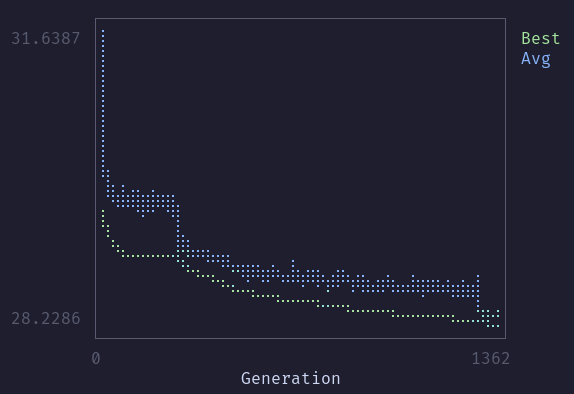
uplot5 is really cool, and I will be using it more in future projects.
Running
Nix
To run the script you can use the Nix Flake directly if you're setup for that kind of thing:
# Will try to render the panda image in this blogpost
nix run "git+https://codeberg.org/xvrqt/genetic-image-encoder?ref=refs/tags/blogpost1"
# Or try it on your own image
nix run "git+https://codeberg.org/xvrqt/genetic-image-encoder?ref=refs/tags/blogpost1" -- < your/image/path> Normal
Or you can clone the git repo, change directory into the Rust project source, and build and run it with Cargo:
git clone https://codeberg.org/xvrqt/genetic-image-encoder
cd genetic-image-encoder/src
git checkout tags/blogpost1
cargo run --release -- < your/image/path> Next Steps
I plan to make this my own image format .jie which, in the tradition of image formats not undertanding the letter 'g' - stands for genetic image encoding or maybe jienetic image extension - I'll leave it to the historians.
I'm also planning to attend Toor Camp6: again this year (thanks, Greg) and so if I could get a good results, or at least calculate and render a generation every 15ms, then I could run a live video of the camp composed entirely of triangles.
Much to Think About
I already have so many questions, and ideas for improving this program:
- What are the best hyperparameters for encoding an image? For speed? For space?
- Do the hyperparameters change based on the type of image? e.g. photograph vs. digital art
- Would the GA work better if colors and triangle position were separated?
- Does correlating the spatial location of triangles with their position in the list improve results?
- Speed up the algoritthm by using my GPU instead of CPU to render and compare images.
- Would Gaussian splatting better than triangles?
- Should I abandon GA's altogether for something else?